How to manage AI coding agents like a junior developer: A practical workflow for 2026

TL;DR
Treat agentic coding tools like Claude Code, and the AI agents that power them, like junior developers: fast, confident, but context-poor and error-prone.
Win rate comes from context injection, not better prompts—avoid overloading context (MECW).
Use a 4-phase workflow: (1) Onboard with constraints + AGENTS.md (2) Scope tickets precisely (3) Give sandboxed tool access (4) Review with automated checks + security audits.
Run the loop: Specify → Generate → Validate (tests/lint/typecheck), don’t debate the model.
Always verify imports to prevent package hallucination / slopsquatting before merging.
The most common complaint I hear from engineering leads isn’t that AI agents can’t write code. It’s that they write dangerous code fast.
They generate entire modules in seconds, but often hallucinate libraries, ignore architectural patterns, or introduce subtle logic bugs that break the build.
Here’s the thing: we’re treating AI agents like calculators and expecting consistent, deterministic outputs. But they’re really more like junior developers. Brilliant, hyper-fast interns who’ve memorized every textbook but have zero tribal knowledge and suffer from daily amnesia.
This article is your handbook for onboarding, scoping, and reviewing their work to turn raw output into production-ready code.
Why treating AI like a junior developer improves ROI
Most developers treat AI tools as search engines, expecting perfect answers from simple queries.
This doesn’t work. The “Confidence vs. Competence” gap is real. Like an eager junior, an AI agent often assumes a dependency exists because “it makes sense” logically. Not because it actually verified the package registry.
Look, the primary bottleneck in 2026 isn’t code generation anymore. It’s context injection. AI models have “university smarts” and know Python syntax perfectly. But they lack the “street smarts” of your specific repository.
They don’t know you deprecated that utility library last week. Or that you never expose API keys in the frontend. And then there’s the “Daily Amnesia” factor. Marketing materials boast about million-token context windows, but research on the Maximum Effective Context Window (MECW) tells a different story.
Performance collapses catastrophically when the input exceeds a model’s effective retention limit. Hallucination rates spike up to 99%. That’s why agents seem to “forget” instructions mid-task.
You wouldn’t dump a 500-page manual on an intern’s desk and expect them to remember page 412. Don’t rely on massive context windows to solve context management either.
Comparison: Human junior vs. AI agent
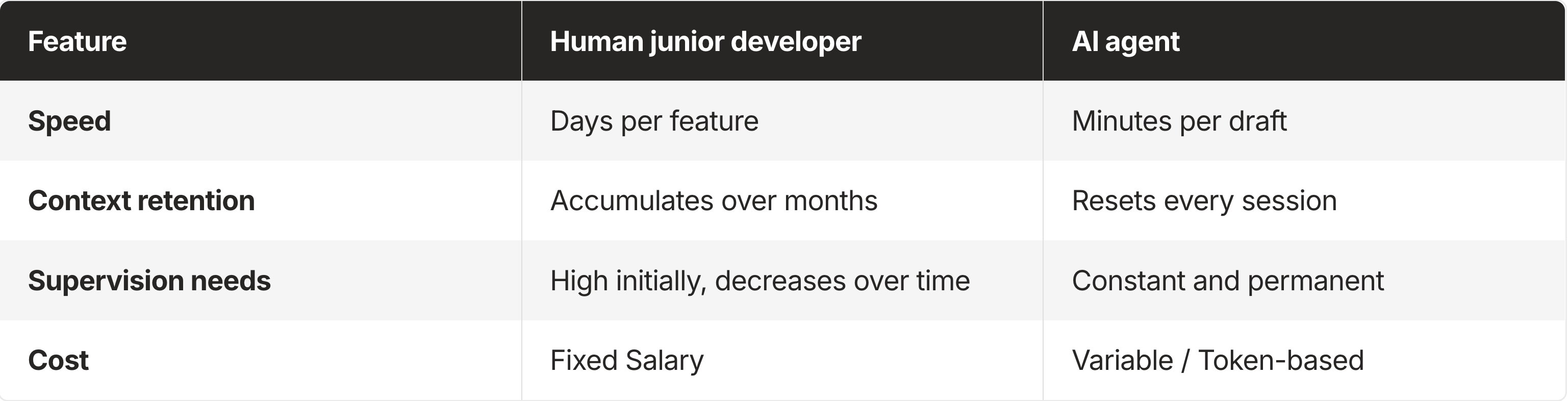
This requires a mindset shift from “coding” to “technical product management.” Your job isn’t typing syntax anymore. You’re defining the constraints within which the agent operates.
Phase 1: Onboard the AI agent with context management
You wouldn’t hire a junior developer and immediately say “Build the login page” without explaining the tech stack, folder structure, or coding conventions. Yet most developers prompt AI exactly this way.
To get usable code, you need to architect the context before the agent writes a single line. That means building a 3-Layer Context Stack.
Set tech stack constraints (languages, versions, frameworks)
Define the immutable reality of your environment. An agent guessing your database version leads to syntax errors or inefficient queries.
Example: “We use TypeScript 5.0, not vanilla JS. We use Tailwind for styling, never CSS modules. We use Go 1.24.”
Document architectural patterns the agent must follow
Explain how you build software. These guidelines prevent the agent from introducing foreign patterns, like using Redux when your team uses React Context.
Example: “All API calls must go through the @/lib/api wrapper. Errors must be logged via our Logger class, not console.log.”
Define negative constraints (what the agent must not do)
Honestly, telling an agent what not to do often matters more than telling it what to do. These constraints prevent security risks and technical debt.
Example: “Never expose API keys in client-side code. Do not use the deprecated moment.js library; use date-fns.”
Create an AGENTS.md file to standardize agent context
Stop repeating these rules in every prompt. Standardize your onboarding by creating a living document in your repository root, named AGENTS.md](https://github.com/agentmd/agent.md), .cursorrules](https://cursor.com/docs/context/rules), or context.md.
This file is your AI’s employee handbook. Modern tools can automatically inject it into the system prompt, so every generation adheres to your team’s tribal knowledge without repetition.
Phase 2: Scope tickets (prompt engineering as management)
Give a junior developer a vague ticket titled “Fix the bug” and they’ll probably fail. Same applies to AI. Prompt engineering is really just ticket scoping.
How to choose the right task size for an AI agent
Task size determines success rate.
Too Big: “Build a user dashboard.” The agent will hallucinate features, miss edge cases, and produce a monolithic, untestable file.
Too Small: “Write a function to add two numbers.” The overhead of context switching and verifying output outweighs the time saved.
Just Right: “Create a React component for the ‘Recent Activity’ widget using our existing Card UI component.”
Core workflow: Specify, generate, validate
Treat the AI as a subordinate, not a peer.
Specify interfaces, data shapes, and constraints
Define clear interfaces and data shapes before generation. Write the function signatures, TypeScript interfaces, or database schemas yourself. Use comments or pseudocode to outline the logic.
If you can’t describe the logic clearly, the AI can’t code it correctly.
Generate code with AGENTS.md context enabled
Execute the prompt with your AGENTS.md context active.
Validate with linting, type checks, and tests
Don’t argue with the AI. If the code fails, run it through automated checks (linting, type-checking, tests). Use the error messages to refine your specification, not to debate the agent.
Example prompt for managing an AI coding agent
Bad: “Fix the login error.”
Good: “I am getting a 401 error on the /auth/login endpoint when the user password contains special characters. Here is the stack trace. Please modify the validation logic in auth.service.ts to allow special characters in the regex. Ensure you update the unit test in auth.test.ts to cover this case. Strictly follow the error handling patterns in AGENTS.md.”
Phase 3: Provide safe tool access and integrations
A junior developer who can’t run the code, see the database schema, or read the issue tracker is useless. An agent restricted to a chat box is just as limited.
Why AI agents need sandboxed tool access
We often fear giving AI access to our tools because of the Lethal Trifecta: sensitive data, untrusted content, and external communication.
But keeping an agent completely isolated turns it into a toy. The solution is sandboxed integration. For a CLI-based agent like Claude Code, the “sandbox” is often your local container or a specific terminal session. For autonomous cloud agents, this requires a remote execution environment (such as E2B or a dedicated VPC) to prevent “prompt injection” from becoming a “system compromise.”
Safe tool access model: Read access first, then write with guardrails
Start by granting Read Access. Let your agent search your Notion documentation, read Linear tickets, or grep the codebase. Read access builds trust and makes sure the agent has the context to make decisions.
Once trust is established, introduce Write Access with Guardrails. Let agents open Pull Requests, write documentation, or update non-critical config files. But restrict them from deploying directly to production or deleting data.
A “middleware” layer becomes critical here. Instead of hardcoding API keys into your agent’s prompt (a massive security risk), use a managed auth layer or an integration proxy. Since tools like Claude Code execute commands directly in your terminal, you need a way to gate sensitive actions. Use an integration manager that handles brokered credentials (where the agent requests an action like “Post to Slack” and a proxy handles the API key injection) rather than giving the agent raw environment variables.
Phase 4: Review AI-generated code (trust but verify)
Never merge AI-generated code without review. The model’s confidence often masks deep flaws.
Automated checks first: Linting, formatting, type checking, tests
Your first line of defense should be automated. Never waste human time reviewing code that hasn’t passed linting, formatting, and type-checking.
If the AI code doesn’t compile or pass the linter, reject it immediately.
Security audit: Prevent package hallucination and slopsquatting
AI is prone to a severe supply-chain vulnerability called “package hallucination” or “slopsquatting.” Attackers actively register malicious packages with names that sound like popular libraries (e.g., reqeusts vs requests).
Research has identified over 200,000 instances of hallucinated packages.
You must verify every new import. Does the package actually exist? Is the spelling correct? Is this the official version?
When using Claude Code, use the grep or ls tools it provides to verify your own package.json or requirements.txt before allowing the agent to run an npm install or pip install on a package you don’t recognize.
AI code review checklist (logic, edge cases, security, loops)
When reviewing AI code, ignore syntax. AI is usually better at syntax than you. Focus your mental energy on:
Business Logic: Does this actually solve the user’s problem?
Edge Cases: Did the AI assume the “happy path” and ignore null states or network errors?
Security: Are secrets exposed? Are imports valid? Is user input sanitized?
Loops: Are there infinite retry loops or recursive logic errors?
If the AI gets stuck or produces garbage, don’t argue with it. Apply the “Restart Rule”: Rewrite your specification (Phase 2), clarify the context (Phase 1), and begin a fresh generation session.
Conclusion: Managing AI agents requires technical delegation
Managing AI isn’t coding. It’s Technical Delegation. 80% of your success depends on how well you manage context and scope. Only 20% comes from the specific prompt you type. As models improve, today’s “junior” will eventually become a “senior.” But the fundamental need for clear context, scoped tasks, and secure integration will remain. The engineers who master delegating to agents will replace those who insist on doing everything themselves. Stop trying to get the AI to do your job. Start training it to become the best assistant you’ve ever had.
FAQ
What does it mean to “treat AI like a junior developer”?
A: Assume the AI is fast but lacks repo-specific context and will make confident mistakes. You must provide constraints, scope tasks tightly, and review output like you would a new hire.
What should go into an AGENTS.md file?
A: Tech stack versions, architectural patterns (where code should live, required wrappers), and negative constraints (what not to do, security rules, banned libraries, logging/error conventions).
How big should an AI coding task be to avoid hallucinations?
A: Small-to-medium, well-bounded tickets with clear inputs/outputs (e.g., one component, one endpoint change, one test update), not “build a whole feature” prompts.
What is the “Specify → Generate → Validate” loop?
A: You define interfaces and constraints first, let the AI draft code second, then validate with lint/typecheck/tests and iterate using error output, not conversation.
Why do AI agents “forget” instructions mid-task even with large context windows?
A: Because performance drops past the model’s effective retention limit (MECW), increasing errors and hallucinations when the agent receives too much context at once.
How do I prevent package hallucination and slopsquatting in AI-generated code?
A: Treat every new import as untrusted: confirm the package exists, verify spelling/maintainer, and prefer approved dependencies before merging.
What tool access should I give an AI agent first?
A: Start with local file-system access and read-only API tokens. As you move to write-actions (like updating Jira or posting to Slack), use an authentication broker so the agent never sees or manages the actual secret keys.
What automated checks should run before a human reviews AI code?
A: Formatting, linting, type-checking, and tests. If the code doesn’t pass automation, reject and re-specify the task.