MCP vs. CLI for AI agents: When to Use Each (A Practical Decision Framework for 2026)

CLI purists call MCP bloated middleware that burns tokens and kills composability. MCP advocates call CLI a developer-centric relic that ignores how 99% of users actually interact with AI agents.
Both sides correctly diagnose the other’s weaknesses and miss their own.
The CLI crowd correctly identifies that connecting a standard GitHub MCP server dumps ~55,000 tokens into context before the agent does anything useful. They correctly note that MCP tools don’t chain. You can’t pipe one into another. They correctly observe that even small models are already RL-trained on shell commands, while MCP schemas carry zero training data advantage. But they wrongly claim that the security model working for a single developer on their own machine scales to multi-tenant, compliance-heavy deployments without additional infrastructure. And they wrongly ignore that the services most business users need don’t have CLIs.
The MCP crowd correctly identifies that OAuth discovery, structured schemas, and granular permissions are required for enterprise SaaS integration. They correctly note that a Sales Director can’t and shouldn’t need to interpret stderr tracebacks. But they wrongly dismiss the token economics as a non-issue, and they wrongly ignore that a developer tracing ML predictions through a local DuckDB instance has no use for JSON-RPC serialization overhead.
Practitioners are quietly converging on a different answer: make the transport decision per tool integration, not per system, based on where the tool runs, how it authenticates, and what the workflow looks like. Your agent will use both. And regardless of which transport you chose for each tool, the design quality of the tool interface determines whether your agent works well, not the protocol.
Most teams skip that second point. They pick a transport and stop there.
You can see this architecture in production today. Claude Code (for developers) and Cowork (for non-technical users), use both CLI and MCP as transport layers, unified behind a higher-level abstraction called Skills. Claude Code runs shell commands, pipes data through grep and jq, and chains Unix tools for local work. It also connects to MCP servers for SaaS integrations. Cowork does the same for business users who never see a terminal. In both cases, the agent calls a Skill, and the Skill routes to the appropriate transport.
These products resolved the debate internally that the community is still having publicly.
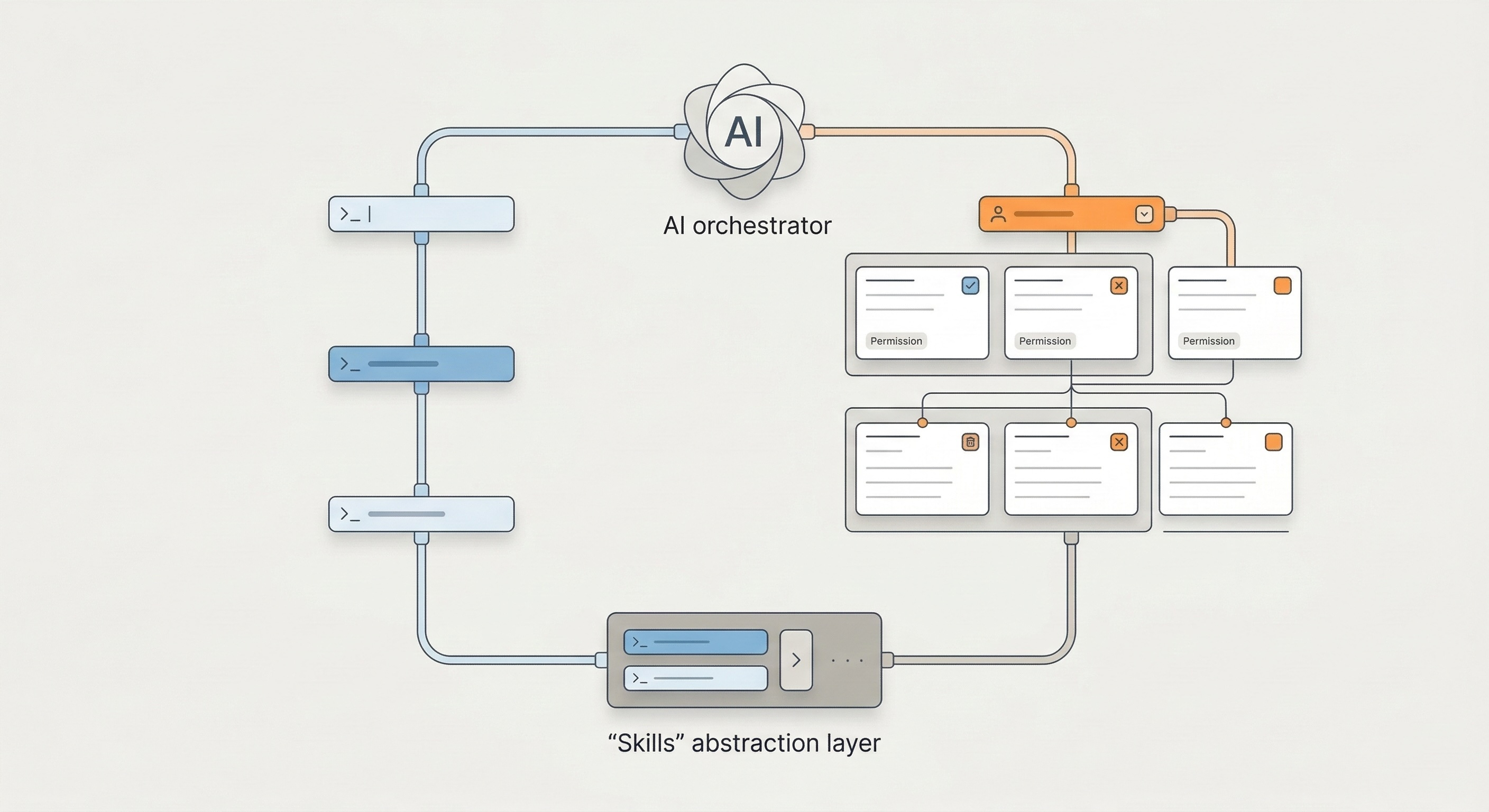
TL;DR: A two-layer decision
Layer 1: Choose the right transport per tool integration (not per system).
Your agent will likely use both CLI and MCP. The question for each integration: which transport fits this specific tool? Apply three factors to each integration in your catalog:
CLI when: the tool runs locally or has a mature vendor CLI (AWS, GitHub, GCP), auth can be pre-configured, and the workflow benefits from piped composition. Backed by decades of battle-tested Unix tooling, deeply embedded in LLM training data.
MCP when: the service has no CLI, requires OAuth/dynamic auth across multiple users, or the workflow is stateful and multi-step. Standardized schemas, RBAC, and audit logs built in.
Layer 2: Design the tool interface for LLM consumption (regardless of protocol).
Minimal upfront context. No 55k-token schema dumps.
On-demand discovery. The agent requests what it needs, when it needs it.
Structured but token-efficient output. Prefer concise text over verbose JSON where possible.
Business context built in. Don’t expose raw API surfaces. Encode team defaults, project scopes, and output constraints.
Skills provide this second layer. Skills abstract the transport entirely. The agent calls a Skill, the Skill routes to CLI or MCP underneath, and neither the agent nor the user needs to know which one fired. Claude Code and Cowork already work this way in production.
Core definitions: How an LLM actually sees CLI vs. MCP
Understanding the cost and security implications requires seeing these interfaces as the model does. A human sees a syntax difference. An LLM sees a structural one.
CLI: Latent knowledge, executed on demand
To an LLM, a CLI tool typically appears as a single function (execute_bash_command or subprocess.run). The model generates a command string and receives text back via stdout/stderr.
The critical feature: the model relies on training data to know what tools exist and how they work. It already “knows” grep, awk, git, jq, and duckdb. It only pulls specific context (via --help) at execution time. This makes CLI effectively zero-cost at initialization.
LLMs work well with CLI for a deeper reason. They’ve been trained on enormous volumes of shell interactions. CLI output formats (concise, line-oriented, pipe-friendly) approach information-theoretic optimality for LLM reasoning. One practitioner reported cutting token count to roughly 60% by reformatting JSON responses as plain text.
Unix tool output isn’t just cheaper. It’s more reasoning-friendly for models trained on text.
MCP: Runtime schema injection
To an LLM, an MCP server injects schemas. When the agent connects, the server sends a list of available tools, resources, and prompts, all defined in JSON schemas. The model doesn’t need to hallucinate flags. The server provides a strict contract: “Function A requires Argument B of type String.”
The critical feature: the model relies on runtime context injection rather than pre-training. This guarantees high reliability against novel APIs but costs significant context window space.
This distinction, latent knowledge vs. context injection, drives every economic and architectural trade-off that follows.
Token cost and latency: The real economics
The most common argument against MCP is “bloat.” The criticism holds up mathematically. But it requires two layers of nuance.
The naive MCP tax
In a standard implementation, an MCP server declares all capabilities upfront. Connect a typical GitHub MCP server and it exposes roughly 90+ tools, each with full input/output schemas and descriptions.
Initialization cost: ~55,000 tokens.
Cost at scale: On Claude 3.5 Sonnet (~$3.00/1M input tokens), that’s roughly $0.16 per session. Run 10,000 automated sessions per day: $1,600 daily, spent just on tool definitions before the agent solves anything.
The CLI alternative
Contrast this with the gh (GitHub CLI) approach. The agent starts with zero tool context.
Agent runs:
gh issue create --help→ ~200 tokens of concise help outputAgent runs:
gh issue create --title "Fix bug" --body "..."Total cost: < 500 tokens. Negligible.
The CLI approach leans on the model’s training. It already knows gh exists. It only requests the specific flags it needs at the moment of execution.
Naive implementations aren’t the whole story
The CLI partisans overreach here. The 55,000-token number represents a badly designed MCP server, not an inherent protocol limitation. Practitioners running MCP servers with 120+ tools report that a well-designed hierarchical server exposes only a short intro at init and lets the model request detailed docs on demand, the same lazy-loading pattern that makes CLI efficient.
Most MCP servers don’t follow this pattern. Most dump everything at init because it’s easier. This is a design quality problem, not a protocol problem, and it’s why you need a design layer (Skills) on top of either transport. You can’t rely on every MCP author to manage context correctly.
Bad tool design can’t be fixed with a better model. It requires a better interface.
Comparison table
When latency compounds
For a single action, MCP’s 50–100ms serialization overhead is invisible. But for an agent looping over 50 files, tracing errors through logs, or running iterative queries, MCP round-trips for every operation feel sluggish. A CLI agent pipes grep results instantly, chains jq transformations, and iterates in a single tool call.
One Hacker News commenter illustrated this concretely: imagine summing totals across 150 order IDs where the API allows one ID per call. With MCP, the agent makes 150 tool calls and balloons the context. With CLI, the agent writes a for loop, parses the values, and sums in one tool call. Maybe 500 tokens total. Roughly 1% of the MCP approach.
Verdict: If your workflow requires high-frequency loops or local data processing, CLI wins on physics. If your workflow requires high reliability on complex, infrequent API calls, MCP’s context tax buys you correctness.
The decision framework: Three factors, applied per integration
The most common mistake in this debate is treating the transport choice as a system-level architectural decision: “We’re a CLI shop” or “We’re an MCP shop.” That’s the wrong level of abstraction.
The best agent systems, including Claude Code and Cowork, use both transports simultaneously and choose per tool integration.
For each tool in your agent’s catalog, apply three factors.
Factor 1: What product surface does the user interact with?
This factor determines your product architecture, whether users interact via a terminal or a chat UI. The critical nuance: it does not determine the transport for every tool underneath.
A developer in a terminal (Claude Code) values speed, transparency, and the ability to re-run exact commands to verify the agent’s work. A machine learning engineer tracing predictions through a local DuckDB instance can interpret tracebacks and wants deterministic, inspectable output. The product surface is a terminal, and many integrations underneath naturally use CLI.
A business user in a chat interface (Cowork) can’t interpret raw terminal streams. They need structured confirmations (”Ticket #123 created”), explicit permission grants, and complexity handled invisibly. The product surface is a chat UI.
The simple “developer → CLI, business user → MCP” framing breaks down here. A business-user-facing product still uses CLI underneath for many tasks. When a non-technical user asks Cowork to create a spreadsheet, format a document, or process a CSV, the agent executes Python subprocesses, runs bash commands, and pipes data through CLI tools. The user never sees any of it. The Skill abstracts the transport.
User type determines the product surface, not the transport. The transport decision happens per-tool, driven by the next two factors.
Factor 2: Where does the tool run and how does it authenticate?
This is the primary driver of the actual transport decision, and it applies per tool, not per system. The answer isn’t as simple as “local = CLI, remote = MCP.” Many major cloud services have excellent CLIs.
Local filesystem or local network. Analyzing logs on a local server, querying a local database, grepping a codebase. No auth barrier, no network hop. Direct file access via CLI is fast and standard. → CLI wins.
Remote services with vendor-maintained CLIs and a developer user. Most articles get this category wrong by defaulting to “remote = MCP.” AWS CLI, gcloud, az, GitHub gh, Stripe CLI, Vercel, Fly.io are mature, well-maintained CLIs for cloud services. A developer with ~/.aws/credentials configured can have an agent run aws s3 ls, pipe through jq, and chain into further processing just like a local tool. These CLIs handle auth through persistent config files, have excellent --help documentation embedded in LLM training data, and produce output that pipes cleanly. → CLI wins, provided the user is a developer, auth is pre-configured in the sandbox (not exposed as env vars the agent can read), and you don’t need multi-tenant user management.
Remote SaaS without vendor CLIs, non-developer users, or multi-tenant auth requirements. This is MCP’s defensible territory. Many services business users depend on, Salesforce, HubSpot, Notion, Asana, don’t have CLIs at all. And when CLIs exist, scaling them across 50 users on 20 services creates fragmentation: each CLI handles auth differently (env variables, config files, JSON, YAML, interactive browser flows). MCP’s Streamable HTTP with OAuth discovery standardizes this into a single handshake. One URL, no manual client registration, dynamic client registration built in. → MCP wins, and the advantage grows with the number of services and users you need to support.
The dividing line: whether auth is pre-configured and single-user, or whether you need standardized auth and discovery across many tools and users.
Factor 3: What does the workflow look like?
Composable and piped. “Find all error logs from the last hour, filter for ‘timeout’, count unique IPs.” This is the Unix philosophy: grep | awk | sort | uniq.
Convenience is the smaller benefit. The larger one is reliability.
The Unix tool ecosystem represents decades of hardened, standardized interfaces. grep outputs lines. sort accepts lines. jq transforms JSON. These implicit contracts have been stress-tested by millions of users over 40+ years. Every edge case has been found and fixed. When you chain grep | sort | uniq -c | sort -rn, every component in that pipeline behaves predictably because it has decades of production hardening.
MCP currently has no native chaining mechanism. The efforts to add composability, tool-to-tool calling, output routing, pipeline definitions, are designing in 2025–2026 what Unix figured out in the 1970s and spent fifty years debugging. That’s not a knock on the effort, but any MCP composability layer carries the reliability risk of new, unproven software.
You’re betting on a v0.1 pipeline framework instead of a v50 one.
There’s a compounding advantage for AI agents: LLMs have been trained on millions of examples of Unix pipe chains. The model doesn’t just know the tools exist. It knows the patterns. It’s seen find . -name "*.py" | xargs grep "import" thousands of times. It improvises novel combinations because the composability grammar is deeply embedded in its weights. MCP composition patterns have zero training data. The model must rely entirely on runtime schema injection when chaining MCP tools, which means higher failure rates on first attempts and more round-trips to recover. → CLI wins on speed, proven reliability, and LLM familiarity.
Stateful and multi-step. “Create a Jira ticket, verify it was created, post the link to Slack, then update the project board.” This requires state management, error recovery, and structured data passing between services. Text streams don’t convey this logic well. Each step depends on the previous step’s output, and you need guarantees (was the ticket actually created?) that unstructured stdout can’t provide. → MCP wins.
Decision matrix
Apply this per tool integration, not per system. A single agent (like Cowork) may use CLI for half its tools and MCP for the other half.
“User type” doesn’t appear as a primary factor. A business user in a chat UI still benefits from CLI-backed tools for local processing. They just interact through a Skill that hides the transport.
User type shapes the product. Environment and workflow shape the plumbing.
That covers Layer 1, the per-integration part. Layer 2 is where most mistakes happen.
Layer 2: Design the tool interface for LLM consumption
You’ve made the transport decision for each tool in your catalog. Most production systems end up with some tools on CLI and others on MCP. The harder problem: how do you present a unified, efficient interface to the LLM across both transports?
A well-designed MCP server that bundles operations and loads schemas hierarchically outperforms a naive CLI wrapper that gives the agent raw shell access with no guidance. A CLI paired with a well-written skill file outperforms a bloated MCP that dumps 54,000 tokens into context at init. Protocol matters less than design quality, and design quality is protocol-agnostic.
The design pattern that makes a mixed CLI/MCP catalog feel like a single coherent toolkit to the agent: Skills.
Why raw transports break down in production
Raw MCP exposes too much context. Connect a standard Jira MCP server and the agent sees 400+ endpoints. Massive token cost. The agent gets confused by options it doesn’t need. It’s like handing someone the full Jira API docs when they just want to create a ticket.
Raw CLI exposes too little context. The agent has shell access but no business logic. It doesn’t know your team’s project conventions, default assignees, or which fields are required. It must hallucinate or ask, and managing authentication per tool becomes tedious.
What Skills solve
A Skill is a managed interface that wraps a transport (CLI or MCP) with business context. It controls what the LLM sees: only the parameters relevant to the task, pre-filled with sensible defaults, with the underlying transport abstracted away.
This is already in production.
Claude Code is a terminal-native agent for developers. It runs bash, grep, git, jq, and other CLI tools directly via subprocess. It also connects to MCP servers for external service integrations. When a developer asks it to “create a Word document,” it loads a docx Skill, a markdown file containing best practices, formatting rules, and code templates, that gives the agent exactly the context it needs for that specific task. The agent calls CLI tools underneath, but the Skill shapes how it uses them.
Cowork targets non-technical users, the business user persona from Factor 1. Same underlying architecture: CLI tools and MCP servers as transports, Skills as the interface layer. A user asking Cowork to “update the Q3 forecast spreadsheet” triggers an xlsx Skill that loads formatting conventions, formula patterns, and file-handling instructions. The user never sees a terminal. They never know whether the underlying execution was a Python subprocess or an MCP call. They get a spreadsheet.
In both products, Skills load on demand. The agent sees short descriptions of available Skills at session start, a few tokens each. The full Skill definition (instructions, templates, context) only loads when the agent decides it’s relevant. This applies the lazy-loading pattern that solves MCP’s context bloat problem as a design default, rather than requiring each tool author to implement it.
The Jira example further illustrates the pattern:
Raw MCP approach: Expose the full Jira MCP server. ~400 endpoints load into context. The agent browses tools, picks
create_issue, asks the user for project key, priority, reporter, issue type. Slow, expensive, error-prone.Raw CLI approach: Expose
jira-cli. The agent struggles with auth, parses complex text output, doesn’t know your team’s conventions.Skill approach: “Create Finance Ticket.” This definition encapsulates the context:
skill:
  name: create_finance_ticket
  description: "Creates a ticket in the Finance board. Use for expense/invoice issues."

  # Business context (injected automatically)
  context:
    project_key: "FIN"
    priority: "High"
    reporter: "{{user.email}}"

  # Transport layer (abstracted from the LLM)
  implementation:
    type: mcp          # Could be CLI, the agent doesn't know or care
    endpoint: jira-mcp-server
    tool_name: create_issue

  # Only these fields are exposed to the LLM
  exposed_parameters:
    - summary
    - description
Token load drops from ~55,000 (all tools) to ~300 (this skill). Reliability stays high because the transport underneath still uses structured schemas. And the agent gets business context it could never infer from a raw API surface.
How Skills interact differently with CLI vs. MCP
Skills interact asymmetrically with each transport.
When a Skill wraps a CLI tool, it can describe a goal, “find all failed deployments in the last 24 hours and summarize by service,” and the agent composes the pipeline to achieve it using Unix patterns it already knows from training data. It improvises: aws cloudwatch ... | jq '.[] | select(.status == "FAILED")' | sort | uniq -c. The Skill provides context and constraints. The agent provides the composition.
When a Skill wraps an MCP tool, it must be more prescriptive. The agent can’t improvise MCP tool chains because there’s no composability grammar in its training data and no native chaining in the protocol. The Skill must define the exact tool sequence, or the agent falls back to sequential round-trips, calling one tool, reading the output, calling the next. This works, but it’s slower, more expensive, and more fragile than a single piped command.
MCP Skills aren’t worse for stateful, multi-service workflows. They’re still the right choice there. But CLI-backed Skills often produce better results on data-processing tasks because they draw on fifty years of composability patterns already embedded in the model’s weights.
Design principles (regardless of protocol)
These apply whether your underlying transport is CLI, MCP, or a raw HTTP call:
1. Minimal upfront context. Don’t dump full tool catalogs at init. Expose short descriptions. Let the agent request detailed schemas on demand. Well-designed MCP servers already do this with hierarchical tool loading. Skills make it the default pattern.
2. On-demand discovery. The agent should be able to ask “what tools are available for Jira?” and get a short list, not receive every tool definition at session start. CLI achieves this naturally via --help. MCP can achieve it with a meta-tool that returns tool names without full schemas.
3. Structured but token-efficient output. JSON is verbose. One practitioner cut token count to 60% by switching to markdown-formatted output. CLI naturally outputs concise text. MCP servers can return minimal, formatted responses instead of full JSON objects. Optimize for LLM reasoning, not for machine parsing.
4. Business context built in. Don’t expose raw API surfaces. Encode team defaults, project scopes, required fields, and output constraints. A Jira MCP just exposes functions. A Jira Skill says “I’m in finance, my project space is FIN-, create tickets with High priority by default.”
5. Swap the transport without touching the interface. If you start with a slow MCP server and later build an optimized CLI binary, the Skill definition stays the same. The agent doesn’t notice. This is how you avoid rewriting prompts and retraining agents every time the plumbing changes.
The MCP-to-CLI conversion movement
This “design quality over protocol” thesis is playing out in real time. A growing ecosystem of tools, mcpshim, CLIHub, MCPorter, converts MCP servers into CLI tools. The pattern: keep MCP’s auth layer and tool definitions, but execute through CLI to eliminate context bloat and gain composability.
This doesn’t reject MCP. It acknowledges that the protocol’s value lives in its registry (what tools exist, how to auth) rather than its runtime (how every invocation gets serialized). These conversion tools build the Skills abstraction from a different starting point and converge on the same architecture that Claude Code and Cowork already ship: MCP for discovery and auth, CLI for execution, Skills for the interface.
Security and governance: Deployment context, not protocol
The CLI-vs-MCP security debate is a proxy war for a deeper problem. Agents now operate across deployment contexts with fundamentally different security models, and no coherent framework spans all of them.
Both transports have real security mechanisms
The claim that “CLI is insecure and MCP is secure” doesn’t hold up under scrutiny.
CLI has decades of security primitives. OS-level permissions, file system ACLs, AppArmor, SELinux, restricted user accounts. These are proven mechanisms for constraining what processes can do. Cloud CLIs like aws, gh, and gcloud have mature credential management: config files, credential helpers, SSO integration, session tokens with automatic rotation. A developer running an agent on their own machine with properly configured OS permissions and CLI credentials has a well-understood security posture.
MCP isn’t magically more secure. You still need to configure OAuth per tool, manage scopes, handle token refresh, set up RBAC policies. The configuration burden doesn’t disappear. It moves to a different layer. A badly configured MCP server with overly permissive scopes is just as dangerous as a badly configured CLI environment.
What actually changes is the deployment context
The real security challenges emerge from where and how the agent is deployed:
Single developer, own machine, own credentials. OS permissions work. CLI credential management works. The agent runs as a restricted user, accesses the developer’s pre-configured credentials, and operates within the same security boundary the developer already inhabits. MCP adds no meaningful security benefit here.
Multi-user, delegated access across an organization. The agent acts on behalf of 50 different users, each with different permissions, across 20 different services. You need delegated auth, per-user scoping, and identity-aware access control. This is hard with CLI, not because CLI is “insecure,” but because CLI credential management was designed for single-user, single-machine contexts. MCP’s OAuth discovery and dynamic client registration solve this problem.
Compliance-heavy, audit-required environments. SOC2, ISO 27001, HIPAA require structured, queryable audit trails showing which agent performed what action on behalf of which user. MCP’s JSON-RPC format produces this naturally:
Request:
{"tool": "create_user", "params": {"email": "..."}}Response:
{"status": "success", "id": "123"}
CLI stdout/stderr can be instrumented to produce similar logs, but it requires custom wrapper tooling. Possible, but not the default.
Agents with code execution and network access. This is the novel security challenge, and it applies regardless of transport. What Simon Willison calls the “lethal trifecta,” the agent accesses secrets, can execute code, and can make network requests, is a property of the agent’s execution environment, not of CLI or MCP. An MCP-connected agent that also has bash access faces the same exfiltration risk as a pure CLI agent. The mitigation (sandboxing via Firecracker, gVisor, containers, secret isolation, network egress controls) is transport-agnostic.
The missing framework
The tension the community experiences isn’t about protocol security. Agents deploy across a spectrum, local to cloud, single-tenant to multi-tenant, hobbyist to enterprise compliance, and the security model that works at one end doesn’t work at the other.
No unified agent security framework exists yet. The CLI-vs-MCP security debate is a symptom of that gap.
This reinforces the case for the Skills layer. If each Skill defines not just what the agent can do but who can invoke it, with what scopes, and what gets logged, then security policy becomes a property of the Skill definition rather than the transport. A “Read Finance Tickets” Skill can enforce read-only access, require user identity, and log every invocation, whether the underlying transport is CLI or MCP.
Practical guidance by deployment context:
Single developer, own machine: CLI with OS permissions and pre-configured credentials suffices. Sandbox the execution environment if the agent has network access.
Multi-user, delegated access: MCP’s standardized auth layer saves you from managing 20 different CLI credential mechanisms. Worth the overhead.
Compliance-required environments: Instrument audit logging regardless of transport. MCP’s structured format makes this easier by default. CLI requires wrapper tooling.
Any context with code execution + secrets: Isolate secrets from the execution environment. Don’t put credentials in env vars the agent can read. This applies equally to CLI and MCP.
The longer view: MCP as bridge, Skills as destination
Several practitioners frame MCP not as the end state but as a useful bridge during a period of rapid change. This is worth considering as you make architectural decisions today.
As context windows grow larger and cheaper, MCP’s “context tax” will diminish. A 55,000-token schema dump that costs $0.16 today might cost $0.01 in 18 months. The token bloat argument has a shelf life.
But the need for business context, security, and clean tool interfaces will only grow. More agents, more users, more tools, more compliance requirements. The abstraction layer, Skills or whatever we end up calling it, is the part of the stack that compounds in value.
Meanwhile, the MCP-to-CLI conversion tools, the gateway architectures, and the hierarchical MCP server patterns all point in the same direction: a separation between the registry layer (what tools exist, how to authenticate) and the execution layer (how to invoke them efficiently). MCP is strong at the registry layer. CLI is strong at the execution layer. Skills sit on top of both.
Build for that separation. Don’t bet your architecture on one transport winning.
Implementation guide: Putting it into practice
Step 1: Audit your tool landscape
List every tool your agent needs. Categorize:
Local:
git,grep,ls, python scripts, DuckDB,jq.Remote/SaaS: GitHub, Slack, Linear, Jira, Salesforce.
Step 2: Apply the per-integration filter
For each tool, ask: Where does it run? What auth does it need? Is the workflow composable or stateful? Use the decision matrix above. Don’t deliberate. Most tools have an obvious answer. Your agent will end up with a mix of CLI and MCP integrations, and that’s correct.
Step 3: Design the tool interface (this is the hard part)
For every tool, CLI or MCP, build a Skill wrapper:
Strip it down to the parameters the agent actually needs.
Add business context (team defaults, project scopes).
Make the output concise and reasoning-friendly.
Don’t expose raw transports to the main agent prompt.
Step 4: Centralize auth and secrets
Don’t let agents handle API keys in plain text.
For CLI tools: pre-authenticate the environment (mounted config volumes in the sandbox). Never put secrets in environment variables the agent can read.
For MCP tools: use a centralized auth handler. The Skill requests a token from your auth provider and injects it into the MCP request. The agent never sees the credential, only the capability.
Step 5: Build the audit layer from day one
If you’ll ever need SOC2 or similar compliance, instrument logging now. For MCP tools, this comes nearly free from the JSON-RPC structure. For CLI tools, wrap subprocess calls in a logging shim that captures the command, timestamp, user context, and a hash of the output.
Conclusion
The MCP vs. CLI war focuses on the wrong layer of the stack. Transport protocol is a per-integration implementation detail, not an architectural commitment.
The practical reality: the most effective AI agents use both. CLI for local processing and cloud services with mature vendor CLIs, drawing on decades of hardened Unix composability already embedded in LLM weights. MCP for SaaS services without CLIs, multi-tenant auth, and stateful workflows where structured schemas and audit logs are required. The choice becomes obvious once you apply the environment and workflow filters to each specific tool.
The choice that actually determines whether your agent works well, the one most teams skip, is the second layer. Designing the tool interface for LLM consumption: minimal upfront context, on-demand discovery, business context built in, structured but token-efficient output. Skills provide this, and it doesn’t depend on protocol.
Claude Code ships today with CLI tools and MCP servers unified behind Skills. Cowork does the same for non-technical users. A business user creating a spreadsheet triggers CLI subprocesses they never see, while connecting to Salesforce routes through MCP they never see either. The agent calls a Skill. The Skill routes to the right transport. The user gets results.
The answer: stop choosing between CLI and MCP at the system level. Choose per integration based on where the tool runs and what the workflow needs. Then make the whole thing invisible behind Skills.
The protocol is plumbing. The interface design is architecture.
Build for the workflow.
FAQ
When should I use MCP vs. CLI for an AI agent?
Don’t choose one for the whole system. Choose per tool integration. Use CLI when the tool runs locally or has a mature vendor CLI (AWS, GitHub, GCP) with pre-configured auth and composable workflows. Use MCP when the service has no CLI, requires multi-tenant OAuth, or involves stateful multi-step transactions. Apply the environment and workflow filters to each tool in your catalog.
Can I use MCP and CLI together in the same agent?
Yes, and you should. Most production agents do. Claude Code and Cowork both use CLI for local processing and MCP for SaaS integrations within the same session. Unify both behind a Skills layer so the agent calls one stable interface regardless of which transport fires underneath.
How do Skills reduce MCP token costs?
Skills expose only the parameters needed for a specific task, avoiding full schema dumps. A Jira Skill exposes 2–3 fields (~300 tokens) instead of the full Jira API (~55,000 tokens).
What’s the biggest security risk with AI agents?
The “lethal trifecta,” the agent accesses secrets, can execute code, and can make network requests, applies regardless of transport. The risk is the deployment context, not CLI vs MCP. A single developer on their own machine has well-understood security (OS permissions, CLI credentials). Multi-user delegated access across an org requires standardized auth (where MCP helps). Compliance environments need structured audit logging (where MCP’s JSON-RPC format is easier to instrument).
Is MCP more secure than CLI?
Not inherently. CLI has decades of OS-level security primitives (permissions, ACLs, sandboxing), and cloud CLIs have mature credential management. MCP has structural advantages in specific contexts: standardized multi-tenant auth, and JSON-RPC audit logs that are easier to query for compliance. The right security model depends on your deployment context, not your transport protocol.
Is MCP always slower than CLI?
For single actions, the overhead is negligible. For tight loops (searching files, iterating queries), CLI is meaningfully faster. The gap compounds with frequency.
Why does CLI composability matter more than just “pipes are convenient”?
Unix pipe conventions have been hardened over 50+ years. Every edge case has been found and fixed. LLMs have internalized these patterns from training data and improvise novel grep | awk | jq chains reliably. MCP has no native chaining, and the composability patterns being built today have zero training data support and zero production hardening. The gap is about reliability, not just speed.
Isn’t MCP token bloat just bad implementation, not a protocol flaw?
Partially. Well-designed hierarchical MCP servers can lazy-load schemas and approach CLI-level efficiency. Most implementations dump everything at init. Skills solve this by making lazy-loading the default regardless of whether the underlying transport is CLI or MCP.